
1000
UID:11Lv.1 大话之王
大话之王  五子棋
五子棋 QQ经典农场偷菜必备工具
最近QQ出现了QQ经典农场,大家又开始定闹钟偷菜了。但是好友一多,每个人成熟的时间都不一样,而且咱们自己的地也不是每块都种一样的作物,算时间简直算到头秃!🤯
为了解放大脑,我手搓了一个 HTML单文件版 的农场计时器。不用安装APP,手机、电脑浏览器打开就能用,专门解决“批量算时间”和“多好友管理”的痛点!
✨ 核心功能亮点
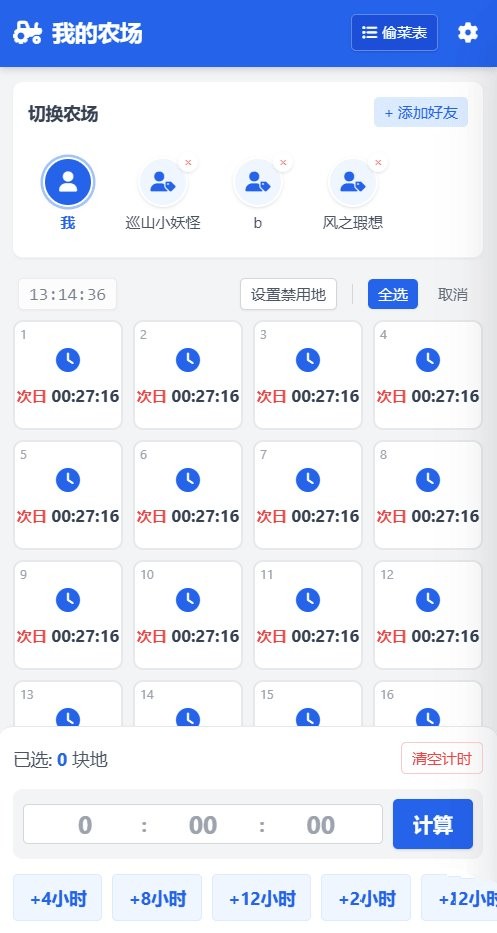
✅ 批量时间计算不再需要一块一块地算!输入游戏里的剩余时间(例如 3:20),直接算出具体的成熟时刻(例如 14:30)。支持全选、多选,或者针对单块地独立设置。
✅ 多好友/小号管理可以添加无限个好友或小号。每个好友都有独立的24块地记录,切换丝滑,数据互不干扰。
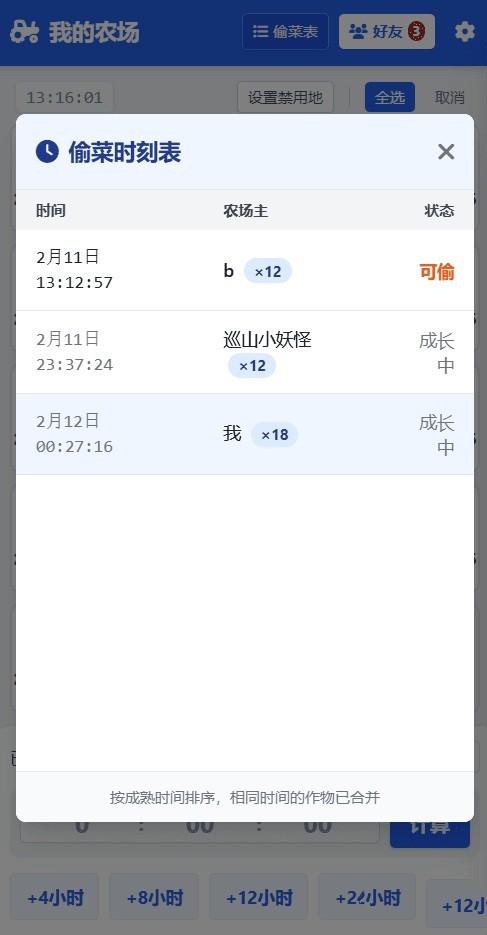
✅ 超强“偷菜时刻表” 📊 不仅能看自己的,还能一键打开统计列表,聚合所有好友的成熟时间。系统自动按时间排序,谁家的菜几点熟,一目了然!
✅ 双导航模式 (新功能!) 📱
• 经典模式:顶部横向好友栏,类似游戏原版体验。
• 沉浸模式:侧边抽屉式列表,支持搜索好友,列表再长也能秒回,不占用屏幕高度。
✅ 个性化定制 🎨
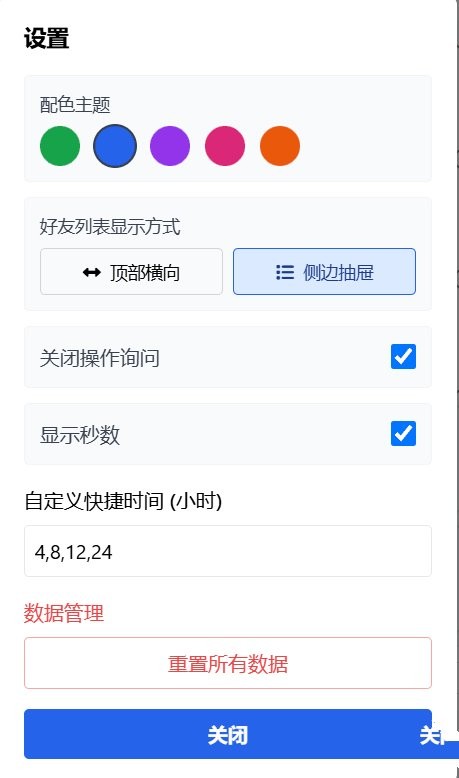
• 5种主题配色:内置“经典绿”、“深海蓝”、“优雅紫”、“活力粉”、“暖阳橙”,看腻了绿色随时换。
• 异形农场适配:支持“设置禁用地”,如果你还在扩建中,没满24块地,可以把空的格子禁用了,全选时自动跳过。
• 快捷时间:自定义快捷按钮(默认4/8/12/24小时),一键添加。
✅ 极致轻量
• 只有一个 .html 文件,保存到手机或电脑本地就能跑。
• 所有数据保存在本地浏览器,不上传服务器,安全放心。
📖 使用教程
1. 下载/保存:复制源码保存为html文件。
2. 打开:用电脑或手机浏览器(Chrome, Safari等)打开文件。
3. 添加好友:点击右上角或侧边栏的“+ 添加好友”。
4. 记录时间:
• 点击格子选中(变色即选中)。
• 在下方输入框输入剩余时间(时:分),点击“计算”。
• 或者直接点击底部的快捷按钮(如 +4小时)。
5. 查看统计:点击顶部的“偷菜表”按钮,查看接下来要定几个闹钟。⏰
⚙️ 进阶设置
点击右上角的 ⚙️ 齿轮图标:
• 关闭操作询问:开启“免打扰模式”,全选、清空不再弹窗确认,手速党必备。
• 显示秒数:如果你是卡秒达人,可以开启精确到秒的显示。
• 切换视图:在“顶部横向”和“侧边抽屉”之间切换
<!DOCTYPE html>
<html lang="zh-CN">
<head>
<meta charset="UTF-8">
<meta name="viewport" content="width=device-width, initial-scale=1.0, maximum-scale=1.0, user-scalable=no">
<title>QQ经典农场收菜工具</title>
<script src="https://cdn.tailwindcss.com"></script>
<link href="https://cdnjs.cloudflare.com/ajax/libs/font-awesome/6.0.0/css/all.min.css" rel="stylesheet">
<style>
/* 定义主题变量 (默认绿色) */
:root {
--theme-color: #16a34a; /* 600 */
--theme-color-hover: #15803d; /* 700 */
--theme-color-dark: #14532d; /* 900 */
--theme-color-light: #dcfce7; /* 100 */
--theme-color-bg: #f0fdf4; /* 50 */
--theme-ring: #86efac; /* 300 */
}
body { font-family: -apple-system, BlinkMacSystemFont, "Segoe UI", Roboto, Helvetica, Arial, sans-serif; background-color: #f3f4f6; }
.plot-grid { display: grid; grid-template-columns: repeat(4, 1fr); gap: 8px; }
@media (min-width: 768px) { .plot-grid { grid-template-columns: repeat(6, 1fr); gap: 12px; } }
.plot-item {
aspect-ratio: 1;
background: white;
border: 2px solid #e5e7eb;
border-radius: 8px;
display: flex;
flex-direction: column;
align-items: center;
justify-content: center;
cursor: pointer;
position: relative;
transition: all 0.2s;
user-select: none;
}
/* 使用主题变量 */
.plot-item.selected {
border-color: var(--theme-color);
background-color: var(--theme-color-light);
}
.plot-item.has-crop { border-color: #f59e0b; }
/* 禁用状态样式 */
.plot-item.disabled {
background-color: #f3f4f6;
border-color: #d1d5db;
cursor: not-allowed;
opacity: 0.6;
}
.plot-item.disabled .plot-content { opacity: 0.2; }
.plot-item.disabled::after {
content: "🚫";
position: absolute;
font-size: 1.5rem;
opacity: 0.5;
}
.disable-mode-active .plot-item:not(.disabled) {
border-style: dashed;
border-color: #ef4444;
}
.plot-number { position: absolute; top: 2px; left: 4px; font-size: 10px; color: #9ca3af; }
.time-text { font-weight: bold; font-size: 0.85rem; color: #374151; white-space: nowrap; }
.status-icon { font-size: 1.2rem; margin-bottom: 2px; }
/* Sidebar Styling */
#friendSidebar { transition: transform 0.3s ease-in-out; }
.sidebar-item {
padding: 10px 12px;
border-bottom: 1px solid #f3f4f6;
display: flex;
justify-content: space-between;
align-items: center;
font-size: 0.85rem;
color: #4b5563;
}
.sidebar-item:hover { background-color: #f9fafb; }
/* 侧边栏激活状态 */
.sidebar-item.active {
background-color: var(--theme-color-bg);
color: var(--theme-color-dark);
border-left: 3px solid var(--theme-color);
}
/* Top Horizontal Scroll Styling */
.friends-scroll::-webkit-scrollbar { height: 4px; }
.friends-scroll::-webkit-scrollbar-thumb { background: #d1d5db; border-radius: 4px; }
.top-friend-item { transition: transform 0.1s; }
.top-friend-item:active { transform: scale(0.95); }
/* Input styling */
.time-input {
text-align: center;
background: transparent;
border: none;
font-size: 1.25rem;
font-weight: bold;
width: 100%;
}
.time-input:focus { outline: none; }
.modal { transition: opacity 0.3s ease-in-out; }
.hidden-modal { opacity: 0; pointer-events: none; }
/* Color Swatches */
.color-swatch { width: 32px; height: 32px; border-radius: 50%; cursor: pointer; border: 2px solid transparent; }
.color-swatch.active { border-color: #374151; transform: scale(1.1); }
</style>
</head>
<body class="h-screen flex flex-col overflow-hidden">
<!-- 顶部导航栏 (使用主题变量) -->
<header class="text-white p-3 shadow-md flex justify-between items-center z-20 shrink-0 transition-colors duration-300 bg-[var(--theme-color)]" id="mainHeader">
<div class="flex items-center gap-2 overflow-hidden">
<h1 id="pageTitle" class="font-bold text-lg truncate"><i class="fas fa-tractor mr-1"></i> QQ经典农场</h1>
</div>
<div class="flex items-center gap-2 shrink-0">
<button onclick="showStatistics()" class="hover:opacity-90 text-white text-xs px-2 py-1.5 rounded border border-white/30 flex items-center shadow bg-[var(--theme-color-hover)]">
<i class="fas fa-list-ul mr-1"></i> 偷菜表
</button>
<!-- 仅在侧边栏模式下显示 -->
<button id="sidebarToggleBtn" onclick="toggleFriendSidebar()" class="hidden bg-white text-[var(--theme-color)] text-xs px-2 py-1.5 rounded font-bold shadow flex items-center">
<i class="fas fa-users mr-1"></i> 好友 <span id="friendCountBadge" class="ml-1 bg-red-500 text-white text-[10px] px-1 rounded-full hidden">0</span>
</button>
<button onclick="toggleSettings()" class="p-1 ml-1"><i class="fas fa-cog"></i></button>
</div>
</header>
<!-- 侧边栏 (好友列表 - 抽屉模式) -->
<div id="friendSidebarOverlay" onclick="toggleFriendSidebar()" class="fixed inset-0 bg-black bg-opacity-50 z-30 hidden"></div>
<aside id="friendSidebar" class="fixed right-0 top-0 h-full w-72 bg-white shadow-2xl transform translate-x-full z-40 flex flex-col">
<div class="p-4 border-b bg-[var(--theme-color-bg)] border-[var(--theme-color-light)] flex justify-between items-center">
<h3 class="font-bold text-gray-700"><i class="fas fa-address-book mr-2 text-[var(--theme-color)]"></i>好友列表</h3>
<button onclick="toggleFriendSidebar()" class="text-gray-400 hover:text-gray-600"><i class="fas fa-times"></i></button>
</div>
<!-- 固定顶部:我的农场 -->
<div onclick="switchView('me')" id="sidebarMeItem" class="sidebar-item cursor-pointer border-b-4 border-gray-50">
<div class="flex items-center gap-3">
<div class="w-8 h-8 rounded-full bg-[var(--theme-color-light)] text-[var(--theme-color)] flex items-center justify-center border">
<i class="fas fa-user"></i>
</div>
<span class="font-bold">我的农场</span>
</div>
</div>
<!-- 搜索栏 -->
<div class="p-2 bg-gray-50 border-b">
<div class="relative">
<i class="fas fa-search absolute left-3 top-2.5 text-gray-400 text-xs"></i>
<input type="text" id="sidebarSearch" oninput="renderSidebarList()" class="w-full pl-8 pr-2 py-1.5 text-sm border rounded focus:outline-none focus:border-[var(--theme-color)]" placeholder="搜索好友...">
</div>
</div>
<!-- 列表区域 -->
<div class="flex-1 overflow-y-auto" id="sidebarList">
<!-- JS 生成 -->
</div>
<!-- 底部添加按钮 -->
<div class="p-3 border-t bg-gray-50">
<button onclick="addFriend()" class="w-full text-white py-2 rounded shadow hover:opacity-90 text-sm font-bold bg-[var(--theme-color)]">
<i class="fas fa-plus mr-1"></i> 添加新好友
</button>
</div>
</aside>
<!-- 主内容区域 -->
<main class="flex-1 overflow-y-auto p-3 pb-40 relative">
<!-- 顶部横向好友栏 (经典模式) -->
<div id="topFriendBar" class="hidden mb-4 bg-white p-3 rounded-lg shadow-sm sticky top-0 z-10 border-b border-gray-100">
<div class="flex justify-between items-center mb-1">
<h2 class="font-bold text-gray-700 text-sm">切换农场</h2>
<button onclick="addFriend()" class="text-xs px-2 py-1 rounded bg-[var(--theme-color-light)] text-[var(--theme-color)]">+ 添加好友</button>
</div>
<!-- 修改点:增加 pt-5 (顶部padding) 彻底解决头像圆环被遮挡的问题 -->
<div class="flex gap-3 overflow-x-auto friends-scroll pt-5 pb-2" id="topFriendList">
<!-- JS 生成 -->
</div>
</div>
<!-- 顶部操作工具条 (包含时钟、禁用、全选) -->
<div class="flex justify-between items-center mb-2 px-1 gap-2 flex-wrap">
<div class="flex items-center gap-2">
<div class="text-sm opacity-70 font-mono text-gray-600 bg-white px-2 py-0.5 rounded shadow-sm border" id="clock">12:00:00</div>
<span id="disableHint" class="text-xs text-red-500 hidden font-bold whitespace-nowrap bg-white px-1 rounded shadow-sm border border-red-100">请点击格子禁用</span>
</div>
<div class="flex gap-2 items-center">
<!-- 禁用按钮移到这里 -->
<button id="disableModeBtn" onclick="toggleDisableMode()" class="text-xs border border-gray-300 bg-white text-gray-600 px-2 py-1 rounded shadow-sm hover:bg-gray-50 transition-colors whitespace-nowrap">
设置禁用地
</button>
<div class="h-4 w-px bg-gray-300 mx-1"></div>
<button onclick="selectAll(true)" class="text-xs text-white font-medium px-2 py-1 rounded shadow-sm bg-[var(--theme-color)]">全选</button>
<button onclick="selectAll(false)" class="text-xs text-gray-500 bg-gray-100 px-2 py-1 rounded">取消</button>
</div>
</div>
<!-- 土地网格 -->
<div id="plotGrid" class="plot-grid">
<!-- JS 生成24块地 -->
</div>
<!-- 底部垫高 -->
<div class="h-20"></div>
</main>
<!-- 底部操作栏 -->
<div class="bg-white border-t shadow-lg p-3 fixed bottom-0 w-full z-10 rounded-t-xl transition-transform duration-300" id="controlPanel">
<!-- 选中状态提示 -->
<div class="flex justify-between items-center mb-3">
<span class="text-sm font-medium text-gray-600">已选: <span id="selectedCount" class="font-bold text-[var(--theme-color)]">0</span> 块地</span>
<button onclick="clearSelectedPlots()" class="text-xs text-red-500 border border-red-200 px-2 py-1 rounded">清空计时</button>
</div>
<!-- 时间输入区 -->
<div class="flex items-center gap-2 mb-3 bg-gray-100 p-2 rounded-lg">
<div class="flex-1 flex items-center bg-white rounded border border-gray-300 px-1">
<input type="number" id="inputH" class="time-input" placeholder="0" min="0">
<span class="text-gray-400 font-bold">:</span>
<input type="number" id="inputM" class="time-input" placeholder="00" min="0" max="59">
<span class="text-gray-400 font-bold sec-display hidden">:</span>
<input type="number" id="inputS" class="time-input sec-display hidden" placeholder="00" min="0" max="59">
</div>
<button onclick="applyTime()" class="text-white font-bold py-2 px-4 rounded shadow hover:opacity-90 whitespace-nowrap bg-[var(--theme-color)]">
计算
</button>
</div>
<!-- 快捷时间按钮 -->
<div class="flex gap-2 overflow-x-auto pb-1" id="quickButtons">
<!-- JS 生成快捷按钮 -->
</div>
</div>
<!-- 统计弹窗 -->
<div id="statsModal" class="fixed inset-0 bg-black bg-opacity-50 z-50 hidden hidden-modal flex items-center justify-center">
<div class="bg-white w-11/12 max-w-md h-3/4 rounded-lg shadow-xl p-0 flex flex-col overflow-hidden">
<div class="p-4 border-b flex justify-between items-center bg-[var(--theme-color-bg)]">
<h3 class="text-lg font-bold text-[var(--theme-color-dark)]"><i class="fas fa-clock mr-2"></i>偷菜时刻表</h3>
<button onclick="closeStats()" class="text-gray-500 hover:text-gray-800"><i class="fas fa-times fa-lg"></i></button>
</div>
<div class="flex-1 overflow-y-auto p-0" id="statsContent">
<!-- 统计列表内容 -->
</div>
<div class="p-3 border-t bg-gray-50 text-center text-xs text-gray-500">
按成熟时间排序,相同时间的作物已合并
</div>
</div>
</div>
<!-- 设置弹窗 -->
<div id="settingsModal" class="fixed inset-0 bg-black bg-opacity-50 z-50 hidden hidden-modal flex items-center justify-center">
<div class="bg-white w-11/12 max-w-md rounded-lg shadow-xl p-5 overflow-y-auto max-h-[90vh]">
<h3 class="text-lg font-bold mb-4">设置</h3>
<div class="mb-4 space-y-3">
<!-- 主题选择 -->
<div class="p-3 bg-gray-50 rounded border border-gray-100">
<label class="block text-sm font-medium text-gray-700 mb-2">配色主题</label>
<div class="flex gap-3 justify-start" id="themeSelector">
<!-- JS 生成色块 -->
</div>
</div>
<!-- 导航模式切换 -->
<div class="p-3 bg-gray-50 rounded border border-gray-100">
<label class="block text-sm font-medium text-gray-700 mb-2">好友列表显示方式</label>
<div class="flex gap-2">
<button onclick="setNavMode('top')" id="btnNavTop" class="flex-1 py-2 text-sm border rounded text-center">
<i class="fas fa-arrows-alt-h mr-1"></i> 顶部横向
</button>
<button onclick="setNavMode('sidebar')" id="btnNavSidebar" class="flex-1 py-2 text-sm border rounded text-center">
<i class="fas fa-list mr-1"></i> 侧边抽屉
</button>
</div>
</div>
<label class="flex items-center justify-between p-3 bg-gray-50 rounded border border-gray-100">
<span class="font-medium text-gray-700">关闭操作询问</span>
<input type="checkbox" id="toggleConfirmations" onchange="saveSettings()" class="form-checkbox h-5 w-5 rounded text-[var(--theme-color)]">
</label>
<label class="flex items-center justify-between p-3 bg-gray-50 rounded border border-gray-100">
<span class="font-medium text-gray-700">显示秒数</span>
<input type="checkbox" id="toggleSeconds" onchange="saveSettings()" class="form-checkbox h-5 w-5 rounded text-[var(--theme-color)]">
</label>
</div>
<div class="mb-4">
<label class="block mb-2 font-medium">自定义快捷时间 (小时)</label>
<input type="text" id="quickTimesConfig" class="w-full border p-2 rounded" placeholder="4,8,12,24">
</div>
<div class="mb-4">
<label class="block mb-2 font-medium text-red-500">数据管理</label>
<button onclick="resetAllData()" class="w-full border border-red-300 text-red-500 p-2 rounded hover:bg-red-50">重置所有数据</button>
</div>
<button onclick="toggleSettings()" class="w-full text-white p-2 rounded font-bold bg-[var(--theme-color)]">关闭</button>
</div>
</div>
<!-- 添加好友弹窗 -->
<div id="friendModal" class="fixed inset-0 bg-black bg-opacity-50 z-50 hidden hidden-modal flex items-center justify-center">
<div class="bg-white w-11/12 max-w-xs rounded-lg p-5">
<h3 class="text-lg font-bold mb-3">添加好友</h3>
<input type="text" id="newFriendName" class="w-full border p-2 rounded mb-3" placeholder="输入好友备注">
<div class="flex gap-2">
<button onclick="closeFriendModal()" class="flex-1 bg-gray-200 py-2 rounded">取消</button>
<button onclick="confirmAddFriend()" class="flex-1 text-white py-2 rounded bg-[var(--theme-color)]">确定</button>
</div>
</div>
</div>
<script>
// --- 主题配置 ---
const THEMES = {
green: { primary: '#16a34a', hover: '#15803d', dark: '#14532d', light: '#dcfce7', bg: '#f0fdf4', ring: '#86efac', name: '经典绿' },
blue: { primary: '#2563eb', hover: '#1d4ed8', dark: '#1e3a8a', light: '#dbeafe', bg: '#eff6ff', ring: '#93c5fd', name: '深海蓝' },
purple:{ primary: '#9333ea', hover: '#7e22ce', dark: '#581c87', light: '#f3e8ff', bg: '#faf5ff', ring: '#d8b4fe', name: '优雅紫' },
pink: { primary: '#db2777', hover: '#be185d', dark: '#831843', light: '#fce7f3', bg: '#fdf2f8', ring: '#f9a8d4', name: '活力粉' },
orange:{ primary: '#ea580c', hover: '#c2410c', dark: '#7c2d12', light: '#ffedd5', bg: '#fff7ed', ring: '#fdba74', name: '暖阳橙' }
};
// --- 数据结构 ---
const DEFAULT_PLOTS = Array(24).fill(null).map((_, i) => ({ id: i, endTime: null, disabled: false }));
let appData = {
settings: {
showSeconds: false,
suppressConfirmations: false,
navMode: 'top',
theme: 'green', // 默认主题
quickTimes: [4, 8, 12, 24]
},
currentView: 'me',
myFarm: JSON.parse(JSON.stringify(DEFAULT_PLOTS)),
friends: []
};
let isDisableMode = false;
let searchTerm = "";
// --- 初始化 ---
function init() {
const saved = localStorage.getItem('qqFarmData');
if (saved) {
const parsed = JSON.parse(saved);
appData = { ...appData, ...parsed };
// 确保新设置字段存在
if (!appData.settings.navMode) appData.settings.navMode = 'top';
if (!appData.settings.theme || !THEMES[appData.settings.theme]) appData.settings.theme = 'green';
fixDataStructure(appData.myFarm);
appData.friends.forEach(f => fixDataStructure(f.plots));
}
// 应用主题
applyTheme(appData.settings.theme);
updateClock();
setInterval(updateClock, 1000);
setInterval(checkAllFarmsStatus, 30000);
renderUI();
// 初始化设置面板
document.getElementById('toggleSeconds').checked = appData.settings.showSeconds;
document.getElementById('toggleConfirmations').checked = appData.settings.suppressConfirmations;
document.getElementById('quickTimesConfig').value = appData.settings.quickTimes.join(',');
renderThemeSelector();
updateNavModeBtns();
toggleSecondsDisplay();
}
function fixDataStructure(plots) {
plots.forEach(p => {
if (typeof p.disabled === 'undefined') p.disabled = false;
});
}
function saveData() {
localStorage.setItem('qqFarmData', JSON.stringify(appData));
}
// --- 主题逻辑 ---
function applyTheme(themeKey) {
const theme = THEMES[themeKey];
if(!theme) return;
const root = document.documentElement;
root.style.setProperty('--theme-color', theme.primary);
root.style.setProperty('--theme-color-hover', theme.hover);
root.style.setProperty('--theme-color-dark', theme.dark);
root.style.setProperty('--theme-color-light', theme.light);
root.style.setProperty('--theme-color-bg', theme.bg);
root.style.setProperty('--theme-ring', theme.ring);
}
function renderThemeSelector() {
const container = document.getElementById('themeSelector');
container.innerHTML = '';
Object.keys(THEMES).forEach(key => {
const theme = THEMES[key];
const isActive = appData.settings.theme === key;
const el = document.createElement('div');
el.className = `color-swatch ${isActive ? 'active' : ''}`;
el.style.backgroundColor = theme.primary;
el.title = theme.name;
el.onclick = () => {
appData.settings.theme = key;
applyTheme(key);
saveSettings();
renderThemeSelector(); // 刷新选中状态
renderUI(); // 刷新界面以应用新颜色类
};
container.appendChild(el);
});
}
// --- 核心逻辑 ---
function updateClock() {
const now = new Date();
document.getElementById('clock').textContent = now.toLocaleTimeString('en-GB', { hour12: false });
const statsModal = document.getElementById('statsModal');
if (!statsModal.classList.contains('hidden')) renderStatsList();
updateGridTimeText();
}
function updateGridTimeText() {
const plots = getCurrentPlots();
plots.forEach((plot, index) => {
const el = document.getElementById(`plot-${index}`);
if (!el || plot.disabled) return;
if (plot.endTime) {
const now = Date.now();
const timeEl = el.querySelector('.time-text');
const iconEl = el.querySelector('.status-icon');
if (now >= plot.endTime) {
if(!el.classList.contains('has-crop')) {
el.classList.add('has-crop');
if(iconEl) iconEl.innerHTML = '<i class="fas fa-check-circle text-orange-500"></i>';
const textContainer = el.lastElementChild;
if(textContainer) textContainer.innerHTML = '<span class="text-xs font-bold text-orange-600">可收</span>';
}
} else {
if(timeEl) timeEl.innerHTML = formatTime(plot.endTime);
}
}
});
}
function checkAllFarmsStatus() { /* 预留 */ }
function calculateTargetTime(h, m, s) {
const now = new Date();
return new Date(now.getTime() + (h * 3600000) + (m * 60000) + (s * 1000)).getTime();
}
function formatTime(timestamp) {
if (!timestamp) return '';
const target = new Date(timestamp);
const now = new Date();
const h = target.getHours().toString().padStart(2, '0');
const m = target.getMinutes().toString().padStart(2, '0');
let timeStr = `${h}:${m}`;
if (appData.settings.showSeconds) {
timeStr += `:${target.getSeconds().toString().padStart(2, '0')}`;
}
const isTomorrow = target.getDate() !== now.getDate();
return isTomorrow ? `<span class="text-xs text-red-500">次日</span> ${timeStr}` : timeStr;
}
function formatFullDate(timestamp) {
const target = new Date(timestamp);
const M = (target.getMonth()+1).toString();
const d = target.getDate().toString();
const h = target.getHours().toString().padStart(2, '0');
const m = target.getMinutes().toString().padStart(2, '0');
let timeStr = `${h}:${m}`;
if (appData.settings.showSeconds) {
timeStr += `:${target.getSeconds().toString().padStart(2, '0')}`;
}
return `${M}月${d}日 ${timeStr}`;
}
// --- UI 渲染 ---
function getCurrentPlots() {
if (appData.currentView === 'me') return appData.myFarm;
const friend = appData.friends.find(f => f.id == appData.currentView);
return friend ? friend.plots : [];
}
function renderUI() {
renderHeader();
renderTopFriendList();
renderGrid();
renderQuickButtons();
// 侧边栏按钮逻辑
const sidebarBtn = document.getElementById('sidebarToggleBtn');
const topBar = document.getElementById('topFriendBar');
if (appData.settings.navMode === 'sidebar') {
sidebarBtn.classList.remove('hidden');
topBar.classList.add('hidden');
const count = appData.friends.length;
const badge = document.getElementById('friendCountBadge');
if(count > 0) {
badge.innerText = count;
badge.classList.remove('hidden');
} else {
badge.classList.add('hidden');
}
} else {
sidebarBtn.classList.add('hidden');
topBar.classList.remove('hidden');
}
}
function renderHeader() {
const titleEl = document.getElementById('pageTitle');
if (appData.currentView === 'me') {
titleEl.innerHTML = '<i class="fas fa-tractor mr-1"></i> 我的农场';
} else {
const friend = appData.friends.find(f => f.id == appData.currentView);
titleEl.innerHTML = `<i class="fas fa-user-tag mr-1"></i> ${friend ? friend.name : '好友'}`;
}
}
// --- 顶部横向好友栏 ---
function renderTopFriendList() {
if (appData.settings.navMode !== 'top') return;
const list = document.getElementById('topFriendList');
const isMe = appData.currentView === 'me';
let html = `
<div onclick="switchView('me')" class="flex-shrink-0 flex flex-col items-center w-16 cursor-pointer top-friend-item">
<div class="w-10 h-10 rounded-full ${isMe ? 'ring-2 bg-[var(--theme-color)] ring-[var(--theme-ring)]' : 'bg-[var(--theme-color-hover)]'} text-white flex items-center justify-center border-2 border-white shadow">
<i class="fas fa-user"></i>
</div>
<span class="text-xs mt-1 font-bold ${isMe ? 'text-[var(--theme-color)]' : 'text-gray-600'} truncate w-full text-center">我</span>
</div>
`;
appData.friends.forEach(f => {
const isCurrent = appData.currentView == f.id;
html += `
<div class="flex-shrink-0 flex flex-col items-center w-16 cursor-pointer group relative top-friend-item">
<div onclick="switchView('${f.id}')" class="w-10 h-10 rounded-full ${isCurrent ? 'bg-[var(--theme-color-light)] ring-2 ring-[var(--theme-ring)] text-[var(--theme-color-dark)]' : 'bg-[var(--theme-color-bg)] text-[var(--theme-color)]'} flex items-center justify-center border-2 border-white shadow">
<i class="fas fa-user-tag"></i>
</div>
<span class="text-xs mt-1 ${isCurrent ? 'text-[var(--theme-color)] font-bold' : 'text-gray-600'} truncate w-full text-center">${f.name}</span>
<button onclick="deleteFriend('${f.id}', event)" class="absolute -top-1 right-1 text-red-400 bg-white rounded-full w-4 h-4 flex items-center justify-center shadow text-[10px] z-10">×</button>
</div>
`;
});
list.innerHTML = html;
}
// --- 侧边栏逻辑 ---
function toggleFriendSidebar() {
const sidebar = document.getElementById('friendSidebar');
const overlay = document.getElementById('friendSidebarOverlay');
if (sidebar.classList.contains('translate-x-full')) {
searchTerm = "";
document.getElementById('sidebarSearch').value = "";
renderSidebarList();
sidebar.classList.remove('translate-x-full');
overlay.classList.remove('hidden');
// 取消自动聚焦,避免弹出键盘
// setTimeout(() => document.getElementById('sidebarSearch').focus(), 300);
} else {
sidebar.classList.add('translate-x-full');
overlay.classList.add('hidden');
}
}
function renderSidebarList() {
const list = document.getElementById('sidebarList');
const isMe = appData.currentView === 'me';
const meItem = document.getElementById('sidebarMeItem');
if(isMe) meItem.classList.add('active');
else meItem.classList.remove('active');
const term = document.getElementById('sidebarSearch').value.toLowerCase();
const filteredFriends = appData.friends.filter(f => f.name.toLowerCase().includes(term));
let html = '';
if(appData.friends.length === 0) {
html = `<div class="p-4 text-center text-gray-400 text-sm">暂无好友</div>`;
} else if (filteredFriends.length === 0) {
html = `<div class="p-4 text-center text-gray-400 text-sm">未找到 "${term}"</div>`;
} else {
filteredFriends.forEach(f => {
const isCurrent = appData.currentView == f.id;
html += `
<div class="sidebar-item group ${isCurrent ? 'active' : ''}">
<div class="flex items-center gap-3 flex-1 cursor-pointer" onclick="switchView('${f.id}')">
<div class="w-8 h-8 rounded-full ${isCurrent ? 'bg-[var(--theme-color-light)] text-[var(--theme-color-dark)]' : 'bg-gray-100 text-gray-500'} flex items-center justify-center border">
<i class="fas fa-user-tag"></i>
</div>
<span class="font-medium truncate max-w-[140px]">${f.name}</span>
</div>
<button onclick="deleteFriend('${f.id}', event)" class="text-gray-300 hover:text-red-500 p-2 transition-colors">
<i class="fas fa-trash-alt"></i>
</button>
</div>
`;
});
}
list.innerHTML = html;
}
function switchView(viewId) {
appData.currentView = viewId;
getCurrentPlots().forEach(p => p.selected = false);
if(isDisableMode) toggleDisableMode();
if (appData.settings.navMode === 'sidebar') {
toggleFriendSidebar();
}
renderUI();
}
function renderGrid() {
const grid = document.getElementById('plotGrid');
const plots = getCurrentPlots();
if (isDisableMode) grid.parentElement.classList.add('disable-mode-active');
else grid.parentElement.classList.remove('disable-mode-active');
grid.innerHTML = '';
plots.forEach((plot, index) => {
const el = document.createElement('div');
let className = 'plot-item';
if (plot.disabled) className += ' disabled';
if (!plot.disabled && plot.selected) className += ' selected';
const now = new Date().getTime();
let content = '';
let icon = '<i class="fas fa-seedling text-gray-300"></i>';
if (!plot.disabled) {
if (plot.endTime) {
if (now >= plot.endTime) {
className += ' has-crop';
icon = '<i class="fas fa-check-circle text-orange-500"></i>';
content = '<span class="text-xs font-bold text-orange-600">可收</span>';
} else {
icon = `<i class="fas fa-clock text-[var(--theme-color)]"></i>`;
content = `<span class="time-text">${formatTime(plot.endTime)}</span>`;
}
} else {
content = '<span class="text-xs text-gray-400">空闲</span>';
}
} else {
content = '<span class="text-xs text-gray-400">已禁用</span>';
icon = '';
}
el.className = className;
el.onclick = () => handlePlotClick(index);
el.id = `plot-${index}`;
el.innerHTML = `
<span class="plot-number">${index + 1}</span>
<div class="status-icon plot-content">${icon}</div>
<div class="plot-content">${content}</div>
`;
grid.appendChild(el);
});
const count = plots.filter(p => p.selected && !p.disabled).length;
document.getElementById('selectedCount').textContent = count;
}
// --- 交互操作 ---
function handlePlotClick(index) {
const plots = getCurrentPlots();
if (isDisableMode) {
plots[index].disabled = !plots[index].disabled;
if (plots[index].disabled) {
plots[index].selected = false;
plots[index].endTime = null;
}
saveData();
} else {
if (plots[index].disabled) return;
plots[index].selected = !plots[index].selected;
}
renderGrid();
}
function toggleDisableMode() {
isDisableMode = !isDisableMode;
const btn = document.getElementById('disableModeBtn');
const disableHint = document.getElementById('disableHint');
if (isDisableMode) {
btn.classList.add('bg-red-50', 'text-red-600', 'border-red-300');
btn.classList.remove('bg-white', 'text-gray-600');
btn.innerHTML = '<i class="fas fa-check mr-1"></i>完成设置';
disableHint.classList.remove('hidden');
selectAll(false);
} else {
btn.classList.remove('bg-red-50', 'text-red-600', 'border-red-300');
btn.classList.add('bg-white', 'text-gray-600');
btn.innerHTML = '设置禁用地';
disableHint.classList.add('hidden');
}
renderGrid();
}
function selectAll(isSelect) {
if (isDisableMode) return;
const plots = getCurrentPlots();
plots.forEach(p => {
if (!p.disabled) p.selected = isSelect;
});
renderGrid();
}
function addFriend() {
document.getElementById('friendModal').classList.remove('hidden', 'hidden-modal');
if(appData.settings.navMode === 'sidebar') {
document.getElementById('friendSidebarOverlay').classList.add('hidden');
}
document.getElementById('newFriendName').focus();
}
function closeFriendModal() {
document.getElementById('friendModal').classList.add('hidden', 'hidden-modal');
document.getElementById('newFriendName').value = '';
if(appData.settings.navMode === 'sidebar') {
document.getElementById('friendSidebarOverlay').classList.remove('hidden');
}
}
function confirmAddFriend() {
const name = document.getElementById('newFriendName').value.trim();
if (!name) return;
const newFriend = {
id: Date.now(),
name: name,
plots: JSON.parse(JSON.stringify(DEFAULT_PLOTS))
};
appData.friends.push(newFriend);
saveData();
document.getElementById('friendModal').classList.add('hidden', 'hidden-modal');
document.getElementById('newFriendName').value = '';
if(appData.settings.navMode === 'sidebar') {
document.getElementById('friendSidebarOverlay').classList.remove('hidden');
document.getElementById('sidebarSearch').value = '';
renderSidebarList();
}
switchView(newFriend.id);
}
function deleteFriend(id, event) {
event.stopPropagation();
if(confirm('确定要删除这个好友吗?数据将无法恢复。')) {
appData.friends = appData.friends.filter(f => f.id != id);
if(appData.currentView == id) appData.currentView = 'me';
saveData();
if(appData.settings.navMode === 'sidebar') renderSidebarList();
renderUI();
}
}
function quickAdd(hours) {
applyTimeLogic(hours, 0, 0);
}
function applyTime() {
const h = parseInt(document.getElementById('inputH').value) || 0;
const m = parseInt(document.getElementById('inputM').value) || 0;
const s = parseInt(document.getElementById('inputS').value) || 0;
if (h === 0 && m === 0 && s === 0) return;
applyTimeLogic(h, m, s);
document.getElementById('inputH').value = '';
document.getElementById('inputM').value = '';
document.getElementById('inputS').value = '';
}
function applyTimeLogic(h, m, s) {
const plots = getCurrentPlots();
let selectedPlots = plots.filter(p => p.selected && !p.disabled);
const isSilent = appData.settings.suppressConfirmations;
if (selectedPlots.length === 0) {
const availablePlots = plots.filter(p => !p.disabled);
if (availablePlots.length === 0) {
alert('当前没有可操作的土地');
return;
}
if (isSilent) {
selectedPlots = availablePlots;
} else {
if(confirm('未选中具体地块,是否对当前页面的所有地块应用此时间?')) {
selectedPlots = availablePlots;
} else {
return;
}
}
}
const targetTime = calculateTargetTime(h, m, s);
selectedPlots.forEach(p => {
p.endTime = targetTime;
p.selected = false;
});
saveData();
renderGrid();
}
function clearSelectedPlots() {
const plots = getCurrentPlots();
let targetPlots = plots.filter(p => p.selected && !p.disabled);
const isSilent = appData.settings.suppressConfirmations;
if (targetPlots.length === 0) {
const allActive = plots.filter(p => !p.disabled && p.endTime);
if (allActive.length === 0) {
alert('当前没有可清空的种植记录');
return;
}
if (isSilent) {
targetPlots = allActive;
} else {
if(!confirm(`未选择具体地块,确定要清空当前页面的所有计时吗?`)) return;
targetPlots = allActive;
}
} else {
if (!isSilent && !confirm(`确定要清空这 ${targetPlots.length} 块地的记录吗?`)) return;
}
targetPlots.forEach(p => {
p.endTime = null;
p.selected = false;
});
saveData();
renderGrid();
}
// --- 统计功能 ---
function showStatistics() {
document.getElementById('statsModal').classList.remove('hidden', 'hidden-modal');
renderStatsList();
}
function closeStats() {
document.getElementById('statsModal').classList.add('hidden', 'hidden-modal');
}
function renderStatsList() {
const listEl = document.getElementById('statsContent');
const now = Date.now();
let allItems = [];
appData.myFarm.forEach(p => {
if(p.endTime && !p.disabled) allItems.push({ owner: '我', plotId: p.id, time: p.endTime, isMe: true });
});
appData.friends.forEach(f => {
f.plots.forEach(p => {
if(p.endTime && !p.disabled) allItems.push({ owner: f.name, plotId: p.id, time: p.endTime, isMe: false });
});
});
allItems.sort((a, b) => a.time - b.time);
const groupedItems = [];
if (allItems.length > 0) {
let currentGroup = { ...allItems[0], count: 1 };
for (let i = 1; i < allItems.length; i++) {
const item = allItems[i];
const isSameTime = Math.abs(item.time - currentGroup.time) < 1000;
const isSameOwner = item.owner === currentGroup.owner;
if (isSameTime && isSameOwner) currentGroup.count++;
else {
groupedItems.push(currentGroup);
currentGroup = { ...item, count: 1 };
}
}
groupedItems.push(currentGroup);
}
if (groupedItems.length === 0) {
listEl.innerHTML = '<div class="p-8 text-center text-gray-400">暂无种植记录</div>';
return;
}
let html = '<table class="w-full text-sm text-left"><thead class="text-xs text-gray-700 uppercase bg-gray-100 sticky top-0"><tr><th class="px-4 py-2">时间</th><th class="px-4 py-2">农场主</th><th class="px-4 py-2 text-right">状态</th></tr></thead><tbody>';
groupedItems.forEach(item => {
const isReady = now >= item.time;
const timeStr = formatFullDate(item.time);
const statusClass = isReady ? 'text-orange-600 font-bold' : 'text-gray-500';
const statusText = isReady ? '可偷' : '成长中';
const rowBg = item.isMe ? 'bg-[var(--theme-color-bg)]' : 'bg-white';
const countBadge = item.count > 1 ? `<span class="inline-flex items-center justify-center px-2 py-0.5 ml-1 text-xs font-bold text-[var(--theme-color-dark)] bg-[var(--theme-color-light)] rounded-full">×${item.count}</span>` : `<span class="text-xs text-gray-400 ml-1">#${item.plotId+1}</span>`;
html += `<tr class="border-b ${rowBg} hover:bg-gray-50"><td class="px-4 py-3 font-mono ${isReady ? 'text-gray-800' : 'text-gray-500'}">${timeStr}</td><td class="px-4 py-3 font-medium">${item.owner} ${countBadge}</td><td class="px-4 py-3 text-right ${statusClass}">${statusText}</td></tr>`;
});
html += '</tbody></table>';
listEl.innerHTML = html;
}
// --- 设置功能 ---
function toggleSettings() {
const modal = document.getElementById('settingsModal');
if (modal.classList.contains('hidden')) {
modal.classList.remove('hidden', 'hidden-modal');
modal.classList.add('opacity-100');
} else {
modal.classList.remove('opacity-100');
modal.classList.add('hidden-modal');
setTimeout(() => modal.classList.add('hidden'), 300);
}
}
function toggleSecondsDisplay() {
const show = appData.settings.showSeconds;
document.querySelectorAll('.sec-display').forEach(el => el.classList.toggle('hidden', !show));
updateGridTimeText();
}
function setNavMode(mode) {
appData.settings.navMode = mode;
updateNavModeBtns();
saveSettings();
renderUI();
}
function updateNavModeBtns() {
const mode = appData.settings.navMode;
const btnTop = document.getElementById('btnNavTop');
const btnSidebar = document.getElementById('btnNavSidebar');
const activeClass = ['bg-[var(--theme-color-light)]', 'border-[var(--theme-color)]', 'text-[var(--theme-color-dark)]'];
const inactiveClass = ['border-gray-300'];
if (mode === 'top') {
btnTop.classList.add(...activeClass);
btnTop.classList.remove(...inactiveClass);
btnSidebar.classList.remove(...activeClass);
btnSidebar.classList.add(...inactiveClass);
} else {
btnSidebar.classList.add(...activeClass);
btnSidebar.classList.remove(...inactiveClass);
btnTop.classList.remove(...activeClass);
btnTop.classList.add(...inactiveClass);
}
}
function saveSettings() {
appData.settings.showSeconds = document.getElementById('toggleSeconds').checked;
appData.settings.suppressConfirmations = document.getElementById('toggleConfirmations').checked;
const inputVal = document.getElementById('quickTimesConfig').value;
const times = inputVal.split(/[,,]/).map(n => parseInt(n.trim())).filter(n => !isNaN(n) && n > 0);
if (times.length > 0) appData.settings.quickTimes = times;
saveData();
toggleSecondsDisplay();
renderQuickButtons();
}
function resetAllData() {
if(confirm('警告:这将删除所有好友和种植记录,恢复到初始状态!确定吗?')) {
localStorage.removeItem('qqFarmData');
location.reload();
}
}
function renderQuickButtons() {
const container = document.getElementById('quickButtons');
container.innerHTML = '';
appData.settings.quickTimes.forEach(hours => {
const btn = document.createElement('button');
btn.className = 'flex-shrink-0 bg-[var(--theme-color-bg)] text-[var(--theme-color)] border border-[var(--theme-color-light)] px-3 py-2 rounded text-sm font-bold active:bg-[var(--theme-color-light)]';
btn.textContent = `+${hours}小时`;
btn.onclick = () => quickAdd(hours);
container.appendChild(btn);
});
}
// 启动
init();
</script>
</body>
</html>